
FAQ
How to get the text object at the specified position in the PDF file and change the content of the text object?
To use Foxit PDF SDK to obtain the text object at the specified position in the PDF file and modify the content of the text object, please follow the steps below:
- Open a PDF file.
- Load the PDF page and get the page object in the page.
- Use
PDFPage.getGraphicsObjectAtPointto get the text object at the specified position. Note: Use the page object to get the rectangle to see the position of the text object. - Change the content of the text object and save the PDF document.
Here is sample code:
[updateText.java]
java
import com.foxit.sdk.PDFException;
import com.foxit.sdk.common.fxcrt.PointF;
import com.foxit.sdk.pdf.PDFDoc;
import com.foxit.sdk.pdf.PDFPage;
import com.foxit.sdk.pdf.graphics.\*;
import static com.foxit.sdk.common.Constants.\*;
import static com.foxit.sdk.pdf.PDFDoc.\*;
import static com.foxit.sdk.pdf.graphics.GraphicsObject.\*;
...
public class graphics\_objects {
...
    static bool ChangeTextObjectContent() throws PDFException {
      String input\_file = input\_path + "AboutFoxit.pdf";
      PDFDoc doc = new PDFDoc(input\_file);
      int error\_code = doc.load(null);
      if (error\_code != e\_ErrSuccess) {
        System.out.println(String.format("The Doc [%s] Error: %d\n", input\_file, error\_code));
        return false;
      }
      // Get original shading objects from the first PDF page.
      PDFPage original\_page = doc.getPage(0);
      original\_page.startParse((e\_ParsePageNormal, null, false);
      PointF pointf = new PointF(92, 762);
      GraphicsObjectArray arr = original\_page.getGraphicsObjectsAtPoint(pointf, 10, e\_TypeText);
      for(int i = 0; i<arr.getSize(); i++) {
        GraphicsObject graphobj = arr.getAt(i);
        TextObject textobj = graphobj.getTextObject();
        textobj.setText("Foxit Test");
      }
      original\_page.generateContent();
      String output\_directory = output\_path + "graphics\_objects/";
      String output\_file = output\_directory + "After\_revise.pdf";
      doc.saveAs(output\_file, e\_SaveFlagNormal);
      return true;
    }
...
}
Is it possible to change the DPI of embedded TIFF images?
Cannot be changed. The DPI of images in PDF is static. If the image already exists, Foxit PDF SDK has no function to change the DPI of the image. The solution is that you can use a third party library to change the image's DPI and then add it to the PDF.
NOTE
- Foxit PDF SDK provides a function
Image.setDPIs, which can be used to set the DPI properties of image objects, but it only supports creation or use using Foxit PDF SDK Images created by theImage.addFramefunction do not support JPX, GIF and TIF formats.
Why when running the simple demo corresponding to the OCR and DWG2PDF modules, even if the engine file has been upgraded to the latest version and the simple demo has correctly configured the engine path, I still encounter the error "The engine file cannot be initialized or the engine file cannot be loaded" on Windows 7 systems?
In Windows 7, you need to copy the dll files starting with api-ms-win\* and the ucrtbase.dll file in the engine directory to the system directory.
- If you are using a 32-bit engine and running on a 32-bit system, you will need to copy the
api-ms-win\*.dllfiles anducrtbase.dllfiles from the engine directory toC:/Windows/System32. - If you are using a 32-bit engine and running on a 64-bit system, you will need to copy the
api-ms-win\*.dllfiles anducrtbase.dllfiles from the engine directory toC:/Windows/SysWOW64. - If you use a 64-bit engine, you need to copy the
api-ms-win\*.dllfiles anducrtbase.dllfiles in the engine directory toC:/Windows/System32.
How to run Office2PDF function in Windows service?
To run the Office2PDF function in a Windows service, you need to configure the office component service and configure permissions.
Take the Word component as an example:
- Press
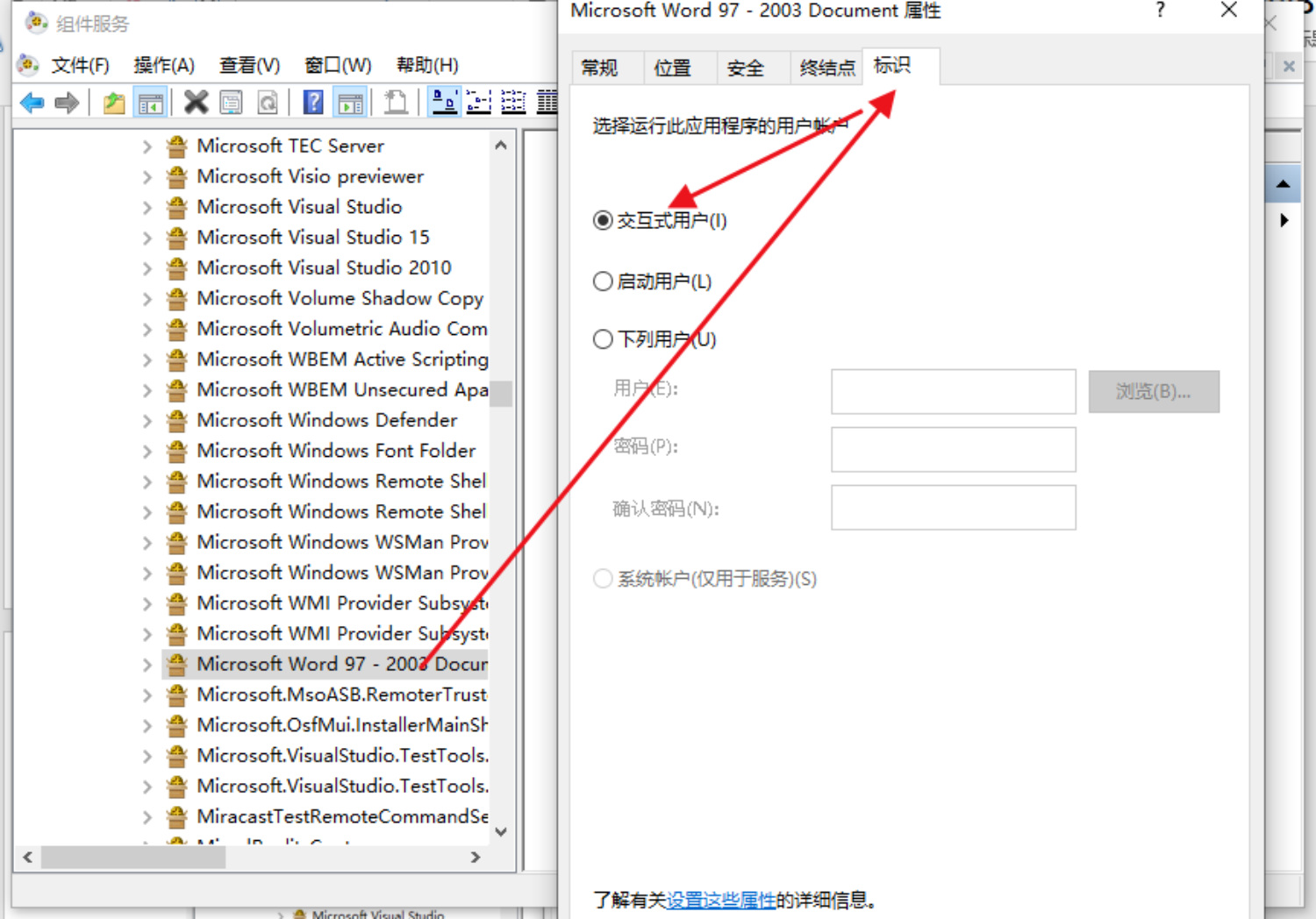
Win+Rand typeDcomcnfgTo open Component Services, navigate to [Component Services] -> [Computer] -> [My Computer] -> [DCOM Configuration] -> [Microsoft Word 97-2003 Document] , right-click and select Properties. Select [Identity] and set it to "Interactive User".
NOTE
- If you cannot find the [Microsoft Word 97-2003 document] using the Dcomcnfg command, try using the
comexp.msc -32command.
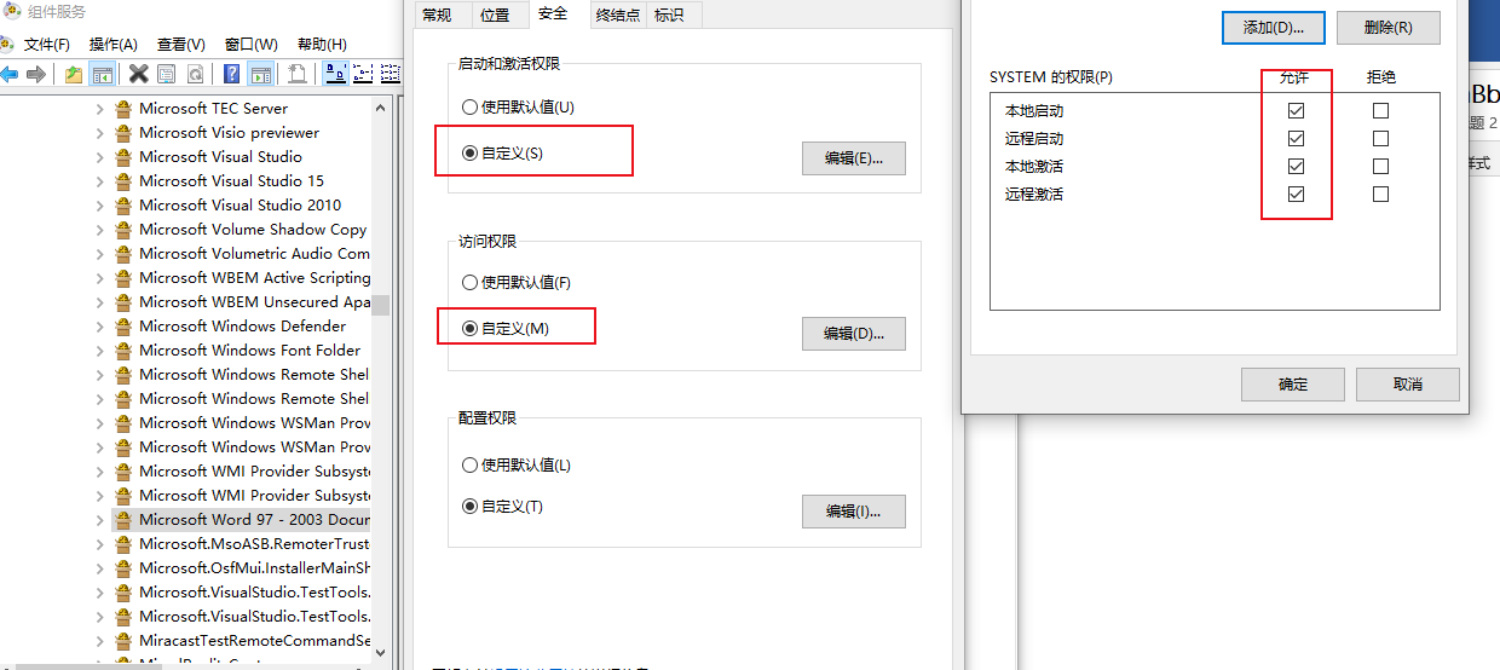
- Set permissions. Click [Security] and set [Launch and Activation Permissions] and [Access Permissions] to Custom. Click Edit to add the current login account of the system and enable all permissions:
- After completing the above settings, you can run the Word2PDF function in the Windows service.
Foxit PDF SDK JavaScript support list
See the JavaScript Support List.
Quote
1.PDF reference 1.7
http://www.iso.org/iso/iso_catalogue/catalogue_tc/catalogue_detail.htm?csnumber=51502
2.PDF reference 2.0
https://www.iso.org/standard/63534.html
3. Foxit PDF SDK API Documentation
sdk_folder/doc/Foxit PDF SDK Java API Reference.html
INFO
- sdk_folder is the directory where the SDK package is decompressed.