
Create custom tools
Event handling
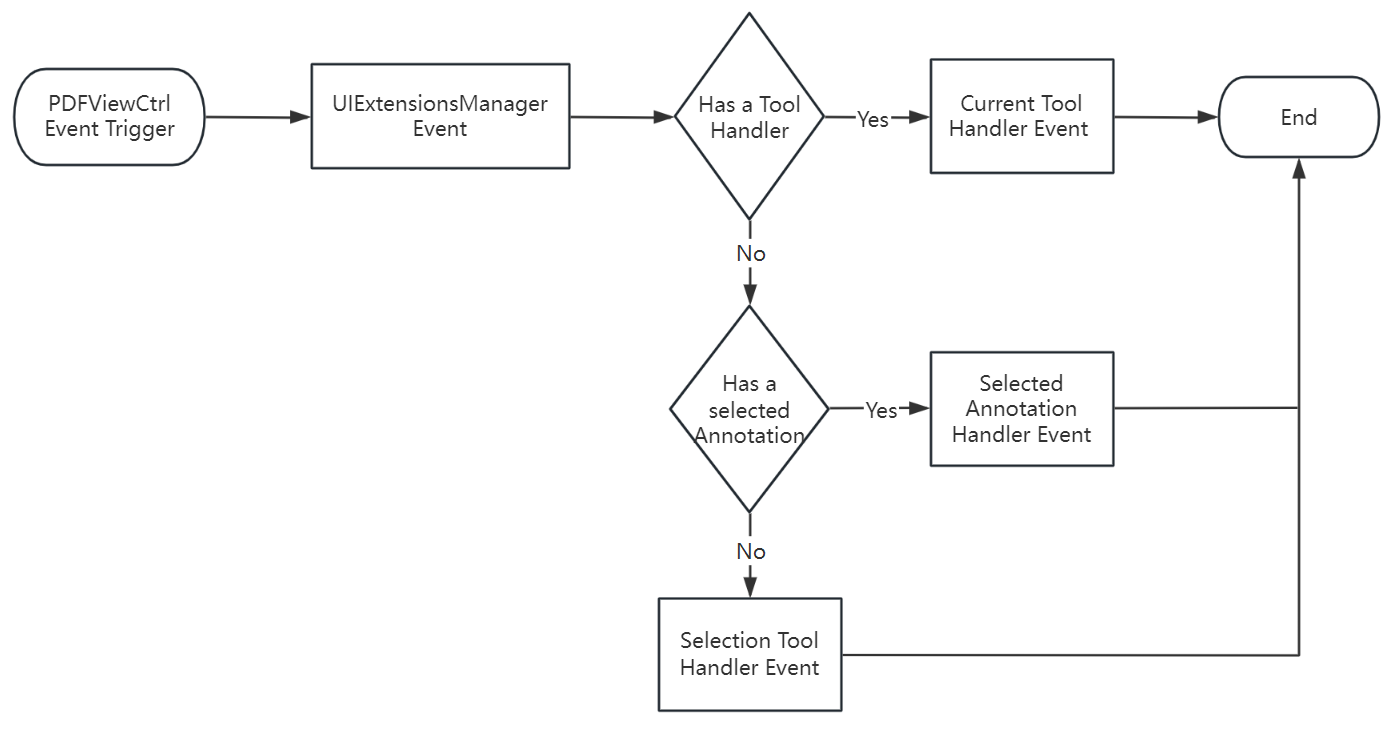
Tool handlers and annotation handlers process touch and gesture events from FSPDFViewCtrl. Events go to UIExtensionsManager:
- Tool handler: If a tool handler is active,
UIExtensionsManagerforwards the event to it and stops. - Annotation handler: If an annotation is selected, the event goes to its annotation handler and stops.
- Selection tool handler: If neither applies, the selection tool handler receives the event.
- Text Selection Tool: Text selection (for example adding highlight annotations).
- Blank Selection Tool: Empty-area events (for example adding note annotations).
NOTE
- Tool and annotation handlers do not handle the same event at once.
- Tool handlers mainly create annotations (link annotations not supported yet), signatures, and text selection.
- Annotation handlers mainly edit annotations and fill forms.
Tool handler and annotation handler flow:
IToolHandler protocol
Implement IToolHandler to create custom tools (screenshot markup, custom measurement, etc.) and register them with UIExtensionsManager.
Each tool implements lifecycle and interaction methods:
| Method | Description |
|---|---|
getName | Tool name |
isEnabled | Whether the tool is enabled |
onActivate | Called when activated |
onDeactivate | Called when deactivated |
onPageViewTap:recognizer: | Tap on page |
onPageViewLongPress:recognizer: | Long press on page |
onPageViewPan:recognizer: | Pan on page |
Example: register a custom tool
objc
// Register
[extensionsManager registerToolHandler:myCustomTool];

// Activate
extensionsManager.currentToolHandler = myCustomTool;

// Unregister
[extensionsManager unregisterToolHandler:myCustomTool];
Custom annotation handlers
Implement IAnnotHandler to customize annotation tap, selection, and drawing:
objc
// Register
[extensionsManager registerAnnotHandler:myAnnotHandler];

// Unregister
[extensionsManager unregisterAnnotHandler:myAnnotHandler];
API reference
See the API reference for IToolHandler and IAnnotHandler.