
Annotation Authority Manager
AnnotationAuthorityManager is an annotation permission management tool provided by Foxit PDF SDK for Web. It is used to centrally control users' interaction capabilities for annotations at the application layer, such as editing, deleting, moving, and rotating. Its core value is that it lets you dynamically define who can operate on which annotations and what operations are allowed, without modifying the original PDF document permissions.
AnnotationAuthorityManager manages view annotation permissions. These are automatically intersected with the document's PDF annotation permissions to produce the final interactive annotation permissions that actually take effect. As a result, you can either preset permission callbacks before a document is opened or update them in real time after the document is opened and have them take effect immediately.
Types of Annotation Permissions
There are three types of annotation permissions:
PDF annotation permissions: restrictions imposed by the PDF document itself on annotation operations. They can be configured through User_Permissions(global) or Annot_Flags(per annotation). Changes to PDF annotation permissions are written into the document and therefore modify the document itself.
View annotation permissions: restrictions on annotation operations at the view layer. View annotation permissions affect only the application and are not written into the document, so they do not modify the document.
Interactive annotation permissions: the intersection of PDF annotation permissions and view annotation permissions. After a PDF document is loaded, user operations on annotations are restricted by these interactive annotation permissions.
Ways to Set Annotation Permissions
The SDK provides the following four ways to set annotation permissions:
Set view annotation permissions through the
PDFViewerconstructor, for example [options.customs.getDocPermissions=(doc:PDFDoc)=>-1] and [options.customs.getAnnotPermissions=(annot:Annot)=>Promise.resolve()].Dynamically set view annotation permissions in real time through the
AnnotationAuthorityManagerutility class, such as setAnnotPermissionCallback.Set PDF annotation permissions globally through PDFDoc::setPasswordAndPermission.
Set PDF annotation permissions through Annot:setFlags.
Using AnnotationAuthorityManager
Note
- You can update interactive annotation permissions by changing either PDF annotation permissions or view annotation permissions. In some scenarios, you may not want to modify the original document and only want to control user annotation operations at the application layer. In that case, you can use the
AnnotationAuthorityManagerutility class to update view annotation permissions in real time and then refresh the interactive annotation permissions. - When interactive annotation permissions are updated at the application layer, the SDK internally intersects the application-defined view annotation permissions with the PDF annotation permissions to determine the final interactive permissions available to the user.
When Interactive Annotation Permissions Are Updated
The following sample code shows how users can update interactive annotation permissions passively or actively.
Passive update of interactive annotation permissions
Before a document is opened, users can set permissions in advance through setAnnotPermissionCallback, [options.customs.getDocPermissions=(doc:PDFDoc)=>-1], and [options.customs.getAnnotPermissions=(annot:Annot)=>Promise.resolve()]. After the document is opened, the SDK automatically updates the interactive annotation permissions, and no extra user action is required.
Note
Here, "passive update" means that the SDK automatically checks and updates interactive annotation permissions after the document is opened, without requiring the user to call an update API explicitly.
javascript// Before opening the document, there are two ways to set view annotation permissions: // Method 1: Configure view annotation permissions based on annotation information when constructing the PDFViewer object const pdfui = new PDFUI({ viewerOptions: { customs: { // Set view annotation permissions getAnnotPermissions: function (annot) { const ANNOTATION_PERMISSION = UIExtension.PDFViewCtrl.constants.ANNOTATION_PERMISSION // Grant all view annotation permissions return Promise.resolve([ANNOTATION_PERMISSION.fully]); } } } }) // Method 2: Set view annotation permissions through the AnnotationAuthorityManager const pdfViewer = await pdfui.getPDFViewer(); // Get the AnnotationAuthorityManager const annotAuthMgr = pdfViewer.getAnnotAuthorityManager(); // Set view annotation permissions annotAuthMgr.setAnnotPermissionCallback(function (annot) { // Grant no operation permissions return Promise.resolve([]); }) // When opening the PDF document, the SDK reads the configured view annotation permissions and automatically updates the interactive annotation permissions pdfui.openPDFByHttpRangeRequest('http:xxx');Active update of interactive permissions
After the document is opened, users can dynamically change permissions and then actively update interactive annotation permissions through updateAll() or update().
javascript// Open a PDF document pdfui.openPDFByHttpRangeRequest('http:xxx'); // Set view annotation permissions through the AnnotationAuthorityManager const pdfViewer = await pdfui.getPDFViewer(); // Get the AnnotationAuthorityManager const annotAuthMgr = pdfViewer.getAnnotAuthorityManager(); // Set view annotation permissions annotAuthMgr.setAnnotPermissionCallback(function (annot) { // Grant no operation permissions to all annotations return Promise.resolve([]); }) // You need to manually update the interactive annotation permissions of all annotations, otherwise the configured view annotation permissions will not take effect immediately await annotAuthMgr.updateAll();In real projects, you can use [PDFViewer.getCurrentPDFDoc][get-cuurent-pdf-doc] to get the current document object and verify whether the current document has been opened. If the returned value is
null, the document is not open.
Use Cases for View Annotation Permissions
In real-world scenarios, you may need to configure different view annotation permissions. At present, the main permission patterns fall into four categories. The following examples assume that an AnnotationAuthorityManager instance has already been created.
No permissions
javascript// Set view annotation permissions annotAuthMgr.setAnnotPermissionCallback(function(annot) { // Grant no operation permissions to all annotations return Promise.resolve([]); })Combined permissions
javascriptconst ANNOTATION_PERMISSION = UIExtension.PDFViewCtrl.constants.ANNOTATION_PERMISSION // Set view annotation permissions annotAuthMgr.setAnnotPermissionCallback(function(annot) { // Grant all annotations the permissions to modify properties and behavior, and to delete, move, rotate, and scale return Promise.resolve([ANNOTATION_PERMISSION.adjustable,ANNOTATION_PERMISSION.deletable,ANNOTATION_PERMISSION.modifiable]); })All permissions
javascriptconst ANNOTATION_PERMISSION = UIExtension.PDFViewCtrl.constants.ANNOTATION_PERMISSION // Set view annotation permissions annotAuthMgr.setAnnotPermissionCallback(function(annot) { // Grant all view annotation permissions return Promise.resolve([ANNOTATION_PERMISSION.fully]); })Ignorable permissions
javascript// Set view annotation permissions annotAuthMgr.setAnnotPermissionCallback(function(annot) { // Ignore all permission restrictions for all annotations return null; })
Use Cases for Interactive Annotation Permissions
Example 1: Set view permissions for an annotation and disallow deletion of a specified annotation
javascript
const pdfViewer = await pdfui.getPDFViewer();
// Get the AnnotationAuthorityManager
const annotAuthMgr = pdfViewer.getAnnotAuthorityManager();
// Get the annotationRender for the specified attachment type on the specified page
const fileAnnotRender = pdfViewer.getAnnotRender(0, 'name');
// Get the specified annotation of the attachment type on the specified page
const fileAnnot = fileAnnotRender.getAnnot();
const ANNOTATION_PERMISSION = PDFViewCtrl.constants.ANNOTATION_PERMISSION
// Set view annotation permissions
annotAuthMgr.setAnnotPermissionCallback(function (annot) {
    // Remove the delete permission from the specified fileAnnot
    if (annot.getObjectNumber() === fileAnnot.getObjectNumber()) {
        return Promise.resolve(Object.keys(ANNOTATION_PERMISSION).filter(per => per !== ANNOTATION_PERMISSION.deletable && per !== ANNOTATION_PERMISSION.fully));
    }
})

// Update the interactive annotation permissions of the specified annotation
await annotAuthMgr.update(fileAnnot);
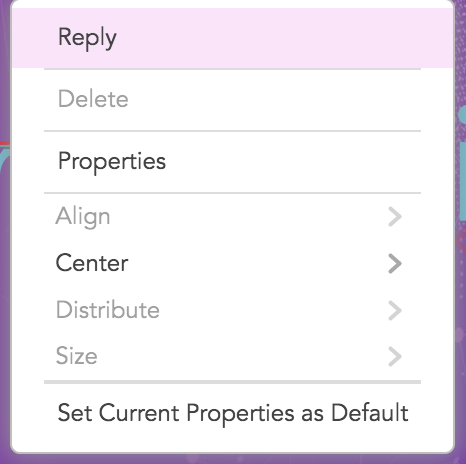
After this code is executed, users can no longer delete the annotation named name.
Example 2: Set view annotation permissions for an annotation and allow editing of callout content
javascript
const pdfViewer = await pdfui.getPDFViewer();
// Get the AnnotationAuthorityManager
const annotAuthMgr = pdfViewer.getAnnotAuthorityManager();
const ANNOTATION_PERMISSION = PDFViewCtrl.constants.ANNOTATION_PERMISSION
// Set view annotation permissions
annotAuthMgr.setAnnotPermissionCallback(function (annot) {
    // Grant editing permission to callout annotations
    if (annot.getIntent() === 'FreeTextCallout') {
        return Promise.resolve([ANNOTATION_PERMISSION.editable]);
    }
})

// Update the interactive annotation permissions of all annotations
await annotAuthMgr.updateAll();
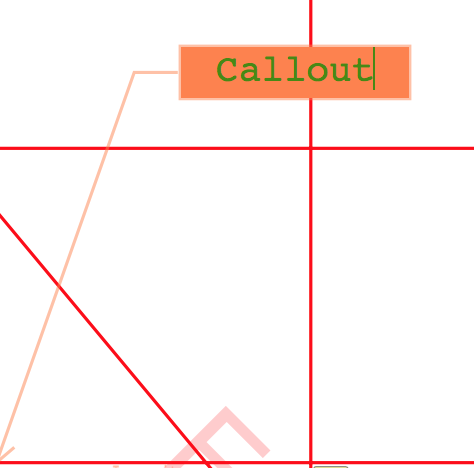
After this code is executed, users can edit FreeText annotations whose intent is callout.
Example 3: Validate PDF annotation permissions and view annotation permissions in a custom component
The following code demonstrates how to verify annotation permissions in a newly added custom component.
javascript
var pdfui = new PDFUI({
    // Add a custom component for deleting annotations
    fragments: [{
        target: 'hand-tool',
        template: '<xbutton class="fv__ui-toolbar-show-text-button" name="cus-delete-button">button behind of hand-tool</xbutton>',
        action: UIExtension.UIConsts.FRAGMENT_ACTION.AFTER,
        config: [{
            target: 'cus-delete-button',
            callback: PDFViewCtrl.shared.createClass({
                mounted: function () {
                    this.permissionHandler();
                },
                permissionHandler() {
                    const Events = UIExtension.UIEvents;
                    let permissionHandler = async () => {
                        const docRender = await pdfui.getPDFDocRender()
                        // Get PDF annotation permissions
                        const userPermission = docRender.getUserPermission().getValue();
                        const {AnnotForm} = UIExtension.PDFViewCtrl.Consts.PDFDocPermission;
                        this.hasAnnotForm = (userPermission & AnnotForm) === AnnotForm;
                        // Whether to disable this component
                        this.component[this.hasAnnotForm ? 'enable' : 'disable']();
                    }
                    this.addDestroyHook(
                        pdfui.addViewerEventListener(Events.openFileSuccess, permissionHandler),
                        pdfui.addViewerEventListener(Events.permissionChanged, permissionHandler),
                        pdfui.addViewerEventListener(Events.activeAnnotation, async annotRender => {
                            // Get the active annotation
                            const annot = annotRender.getAnnot();
                            const pdfViewer = await pdfui.getPDFViewer();
                            // Get the AnnotationAuthorityManager
                            const annotAuthMgr = pdfViewer.getAnnotAuthorityManager();
                            // Get the view annotation permissions of the specified annotation
                            const annotPermission = await annotAuthMgr.getPermission(annot);
                            // Whether the annotation can be deleted
                            const isDeleteAble = annotPermission.isDeletable();
                            // Whether to disable this component
                            this.component[isDeleteAble && this.hasAnnotForm ? 'enable' : 'disable']();
                        })
                    )
                }
            }, UIExtension.Controller)
        }]
    }]
});
Limitations of View Annotation Permissions
Current limitations of view annotation permissions:
- The
Redaction Applyfeature does not support interactive permission configuration. AnnotationAuthorityManagercurrently does not supportForm Widget.