
Group component
The Group component separates toolbar controls with vertical dividers. Each group represents a category and can collapse on small screens.
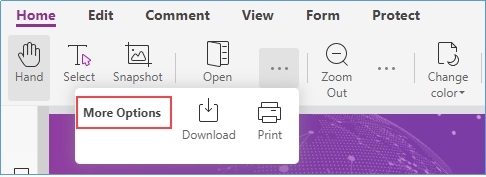
When a group collapses, hidden controls appear in a dropdown opened from the ... button:

Code example
Getting started
html
<html>
<template id="layout-template">
    <webpdf>
        <toolbar>
            <group-list>
                <group name="home-tab-group-hand">
                    <hand-button></hand-button>
                    <selection-button>Selection</selection-button>
                    <snapshot-button></snapshot-button>
                </group>
                <group name="home-tab-group-io">
                    <open-file-dropdown></open-file-dropdown>
                    <download-file-button></download-file-button>
                </group>
            </group-list>
        </toolbar>
        <div class="fv__ui-body">
            <viewer></viewer>
        </div>
    </webpdf>
</template>
</html>
<style>
</style>
<script>
    var CustomAppearance = UIExtension.appearances.Appearance.extend({
        getLayoutTemplate: function () {
            return document.getElementById('layout-template').innerHTML;
        },
        disableAll: function () {
        }
    });
    var libPath = window.top.location.origin + '/lib';
    var pdfui = new UIExtension.PDFUI({
        viewerOptions: {
            libPath: libPath,
            jr: {
                licenseSN: licenseSN,
                licenseKey: licenseKey
            }
        },
        renderTo: document.body,
        appearance: CustomAppearance,
        addons: []
    });
</script>
Set shrink-size
In the example below, group-list sets shrink-size to 762 pixels. When the root <webpdf> width is less than 762px, child groups without their own shrink-size collapse. When the width is less than 600px, the group with shrink-size="600" collapses as well.
html
<html>
<template id="layout-template">
    <webpdf>
        <toolbar>
            <group-list shrink-size="762">
                <group name="home-tab-group-hand">
                    <hand-button></hand-button>
                    <selection-button>Selection</selection-button>
                    <snapshot-button></snapshot-button>
                </group>
                <group name="home-tab-group-io" shrink-size="600">
                    <open-file-dropdown></open-file-dropdown>
                    <download-file-button></download-file-button>
                </group>
            </group-list>
        </toolbar>
        <div class="fv__ui-body">
            <viewer></viewer>
        </div>
    </webpdf>
</template>
</html>
<style>
</style>
<script>
    var CustomAppearance = UIExtension.appearances.Appearance.extend({
        getLayoutTemplate: function () {
            return document.getElementById('layout-template').innerHTML;
        },
        disableAll: function () {
        }
    });
    var libPath = window.top.location.origin + '/lib';
    var pdfui = new UIExtension.PDFUI({
        viewerOptions: {
            libPath: libPath,
            jr: {
                licenseSN: licenseSN,
                licenseKey: licenseKey
            }
        },
        renderTo: document.body,
        appearance: CustomAppearance,
        addons: []
    });
</script>
Specify controls to keep when collapsed
html
<html>
<template id="layout-template">
    <webpdf>
        <toolbar>
            <group-list shrink-size="762">
                <!-- retain two components after shrinking -->
                Specify
                <group name="home-tab-group-hand" retain-count="2">
                    <hand-button></hand-button>
                    <selection-button>Selection</selection-button>
                    <snapshot-button></snapshot-button>
                </group>
                <!-- If the retain-count value is equal to the components count, no shrinkag will occur -->
                <group name="home-tab-group-io" retain-count="2">
                    <open-file-dropdown></open-file-dropdown>
                    <download-file-button></download-file-button>
                </group>
            </group-list>
        </toolbar>
        <div class="fv__ui-body">
            <viewer></viewer>
        </div>
    </webpdf>
</template>
</html>
<style>
</style>
<script>
    var CustomAppearance = UIExtension.appearances.Appearance.extend({
        getLayoutTemplate: function () {
            return document.getElementById('layout-template').innerHTML;
        },
        disableAll: function () {
        }
    });
    var libPath = window.top.location.origin + '/lib';
    var pdfui = new UIExtension.PDFUI({
        viewerOptions: {
            libPath: libPath,
            jr: {
                licenseSN: licenseSN,
                licenseKey: licenseKey
            }
        },
        renderTo: document.body,
        appearance: CustomAppearance,
        addons: []
    });
</script>
Set shrink-title
In the image below, More Options is the title shown when the group is collapsed:
html
<html>
<template id="layout-template">
    <webpdf>
        <toolbar>
            <group-list shrink-size="762">
                <group name="home-tab-group-hand" retain-count="2" shrink-title="options">
                    <hand-button></hand-button>
                    <selection-button>Selection</selection-button>
                    <snapshot-button></snapshot-button>
                </group>
                <group name="home-tab-group-io" shrink-title="options">
                    <open-file-dropdown></open-file-dropdown>
                    <download-file-button></download-file-button>
                </group>
            </group-list>
        </toolbar>
        <div class="fv__ui-body">
            <viewer></viewer>
        </div>
    </webpdf>
</template>
</html>
<style>
</style>
<script>
    var CustomAppearance = UIExtension.appearances.Appearance.extend({
        getLayoutTemplate: function () {
            return document.getElementById('layout-template').innerHTML;
        },
        disableAll: function () {
        }
    });
    var libPath = window.top.location.origin + '/lib';
    var pdfui = new UIExtension.PDFUI({
        viewerOptions: {
            libPath: libPath,
            jr: {
                licenseSN: licenseSN,
                licenseKey: licenseKey
            }
        },
        renderTo: document.body,
        appearance: CustomAppearance,
        addons: []
    });
</script>
API
Group component template
Template example:
html
<group-list shrink-size="762">
    <group retain-count="2" shrink-title="options"></group>
    <group retain-count="1" shrink-title="options"></group>
</group-list>
group-list template attributes:
| Property | Description | Type | Default | Version |
|---|---|---|---|---|
| shrink-size | Width in pixels; collapse triggers when <webpdf> is narrower than this value | number | 1024 | 7.0.0 |
group template attributes:
| Property | Description | Type | Default | Version |
|---|---|---|---|---|
| retain-count | Number of controls to keep visible when collapsed | number | 1 | 7.0.0 |
| shrink-title | Title at the top of the collapsed dropdown | string | '' | 7.0.0 |
| shrink-size | Width in pixels; when <webpdf> is narrower, this group collapses and ignores the parent group-list value | number | Same as parent group-list by default | 7.0.0 |
Methods
<group> methods:
| Method | Description | Version |
|---|---|---|
setRetainCount(count: number): void | Set how many controls stay visible when collapsed | 7.0.0 |
setShrinkTitle(title: string): void | Set the dropdown title when collapsed | 7.0.0 |
Events
<group> events:
| Name | Description | Example | Version |
|---|---|---|---|
shrink | Fired when the group collapses or expands | group.on('shink', (isShrinked) => void) | 7.4.0 |
<group-list> events:
| Name | Description | Example | Version |
|---|---|---|---|
shrink | Fired when a child group collapses or expands | groupList.on('shink', (groupComponent, isShrinked) => void) | 7.4.0 |