
CORS
Overview
What is CORS
CORS (Cross-Origin Resource Sharing) is a W3C mechanism that uses extra HTTP response headers so browsers can allow a page to access resources from another origin, beyond the same-origin limits of classic AJAX.
For more detail, see MDN: CORS.
Same-origin policy
The same-origin policy isolates origins to reduce attack surface. It limits how a page or its scripts interact with resources from another origin. For example, an AJAX call to a different origin is blocked and logged in the console.
Two URLs are the same origin when protocol, host, and port match. Examples:
| URLs | Result | Reason |
|---|---|---|
http://www.company.com/https://www.company.com/ | Different origin | Different protocol |
http://www.company.com/http://www.company.net/ | Different origin | Different host |
http://www.company.com/http://blob.company.com/ | Different origin | Different host |
http://www.company.com/http://www.company.com:8080/ | Different origin | Different port (default for http:// is 80) |
http://www.company.com/http://www.company.com/blob.html | Same origin | Path only differs |
http://www.company.com/blog/index.htmlhttp://www.company.com/blob.html | Same origin | Path only differs |
http://192.168.0.1/http://192.168.1.1 | Different origin | Different IP |
Simple vs non-simple CORS requests
Browsers classify CORS requests as simple or non-simple.
A request is simple only if:
- The method is
HEAD,GET, orPOST. - Headers are limited to:
AcceptAccept-LanguageContent-LanguageLast-Event-IDContent-Typeis one of:application/x-www-form-urlencoded,multipart/form-data,text/plain.
Browsers handle simple and non-simple requests differently.
Simple requests
The browser sends the request with an Origin header.
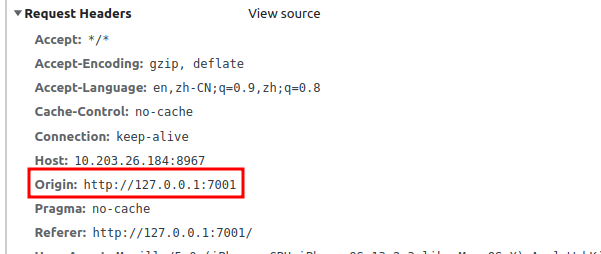
Origin identifies the page’s origin (protocol, host, port). The server can set Access-Control-Allow-Origin to allow or deny the response.
Non-simple requests
For non-simple requests, the browser first sends an OPTIONS preflight request to ask whether the cross-origin request is allowed.
After the preflight response, the browser checks headers such as Access-Control-Allow-Origin and Access-Control-Allow-Methods before sending the actual request.
Typical CORS errors
Missing
Access-Control-Allow-Origin:textAccess to fetch at 'http://127.0.0.1:8967/1.pdf' from origin 'http://127.0.0.1:7001' has been blocked by CORS policy: No 'Access-Control-Allow-Origin' header is present on the requested resource. If an opaque response serves your needs, set the request's mode to 'no-cors' to fetch the resource with CORS disabled.Invalid
Access-Control-Allow-Originvalue:textAccess to fetch at '<target origin, e.g. http://192.168.0.1:8080>' from origin 'http://127.0.0.1:7001' has been blocked by CORS policy: The 'Access-Control-Allow-Origin' header contains the invalid value '<header value>'. Have the server send the header with a valid value, or, if an opaque response serves your needs, set the request's mode to 'no-cors' to fetch the resource with CORS disabled.
Access-Control-Allow-OriginmismatchtextAccess to fetch at 'http://127.0.0.1:8967/1.pdf' from origin 'http://127.0.0.1:7001' has been blocked by CORS policy: Response to preflight request doesn't pass access control check: The 'Access-Control-Allow-Origin' header has a value '<header value, e.g. http://127.0.0.1:9999>' that is not equal to the supplied origin. Have the server send the header with a valid value, or, if an opaque response serves your needs, set the request's mode to 'no-cors' to fetch the resource with CORS disabled.Missing
Access-Control-Allow-HeaderstextAccess to fetch at 'http://127.0.0.1:8967/1.pdf' from origin 'http://127.0.0.1:7001' has been blocked by CORS policy: Request header field range is not allowed by Access-Control-Allow-Headers in preflight response
CORS solutions
Use a proxy to avoid cross-origin requests from the browser, or configure CORS on the file server.
Proxy server
A proxy sits between the client and the target server. The browser talks to the same origin as the app, so CORS does not apply. Below: Nginx and Node.js proxy /prefix/* to http://third_party.file.server, stripping /prefix. Example: http://location:3000/prefix/path/to/some.pdf → http://third_party.file.server/path/to/some.pdf.
Nginx proxy
Edit your Nginx config (often /etc/nginx/nginx.conf), find the server block, and add:
nginx
location ~* ^/prefix/(.*) {
    proxy_pass http://third_party.file.server/$1$is_args$args;
    proxy_redirect off;
}
Nginx rewrites the path and forwards requests that start with /prefix to the file server.
Node.js proxy
Examples for Express, Koa, and NestJS.
Express
Use
http-proxy-middleware:javascriptconst express = require('express'); const { createProxyMiddleware } = require('http-proxy-middleware'); const app = express(); app.use('/prefix', createProxyMiddleware({ target: 'http://third_party.file.server', changeOrigin: true, pathRewrite: { ['^/prefix']: '' } }));Koa
Use
koa-proxy:javascriptconst Koa = require('koa'); const proxy = require('koa-proxy'); const app = new Koa(); app.use( proxy('/prefix', { host: 'http://third_party.file.server', match: /^\/prefix\/, map: function(path) { return path.replace('/prefix', ''); / Remove /prefix from the path } }) )NestJS
Same pattern with
http-proxy-middleware:typescriptimport { NestFactory } from '@nestjs/core'; import { AppModule } from './app.module'; import { createProxyMiddleware } from 'http-proxy-middleware'; async function bootstrap() { const app = await NestFactory.create(AppModule); / Proxy endpoints app.use('/prefix', createProxyMiddleware({ target: 'http://third_party.file.server', changeOrigin: true, pathRewrite: { [`^/prefix`]: '', } })); await app.listen(3000); } bootstrap();
Configure CORS
In Foxit PDF SDK for Web, PDFViewer.openPDFByHttpRangeRequest often needs CORS. The API sends Range requests and reads Content-Range for file size. Configure at least:
bash
Access-Control-Allow-Headers: Range;
Access-Control-Allow-Origin: *; / For production, prefer matching the request Referer origin
Access-Control-Expose-Headers: Content-Range; / Exposed headers are readable from JavaScript
Scenarios below show common server setups.
Web server CORS
Nginx
Add to
nginx.conf(often/etc/nginx/nginx.conf):nginxserver { listen 8967; server_name 127.0.0.1; charset utf8; location / { root "/path/to/files/directory/"; if ($request_method = OPTIONS) { add_header 'Access-Control-Allow-Headers' 'Range'; add_header 'Access-Control-Allow-Origin' '*'; add_header 'Access-Control-Expose-Headers' 'Content-Range'; return 204; } add_header 'Access-Control-Allow-Headers' 'Range'; add_header 'Access-Control-Allow-Origin' '*'; add_header 'Access-Control-Expose-Headers' 'Content-Range'; } }*allows any origin—convenient but insecure. Restrict by origin in production:Map allowed origins (example:
foxit.comsubdomains):nginxmap $http_origin $cors { '~*^https?://.*.foxit.com$' 'true'; }Set
Access-Control-Allow-Originwhen$corsis true:nginxmap $cors $allow_origin { 'true' $http_origin; }Map
Access-Control-Allow-Headersfor CORS requests:nginxmap $cors $allow_headers { 'true' 'Range'; }Combined example:
nginxmap $http_origin $cors { '~*^https?://.+.foxit.com$' 'true'; } map $cors $allow_origin { 'true' $http_origin; } map $cors $allow_headers { 'true' 'Range'; } map $cors $allow_expose_headers { 'true' 'Content-Range'; } server { listen 8967; server_name 127.0.0.1; charset utf8; location / { root "/path/to/files/directory/"; if ($request_method = OPTIONS) { add_header 'Access-Control-Allow-Headers' $allow_headers; add_header 'Access-Control-Allow-Origin' $allow_origin; add_header 'Access-Control-Expose-Headers' $allow_expose_headers; return 204; } add_header 'Access-Control-Allow-Headers' $allow_headers; add_header 'Access-Control-Allow-Origin' $allow_origin; add_header 'Access-Control-Expose-Headers' $allow_expose_headers; } }
Run
nginx -t, thennginx -s reloadif the test passes.Tomcat
Example CORS filter; see Tomcat docs
xml<filter> <filter-name>CorsFilter</filter-name> <filter-class>org.apache.catalina.filters.CorsFilter</filter-class> </filter> <init-param> <param-name>cors.allowed.origins</param-name> <param-value>https://*.foxit.org</param-value> </init-param> <init-param> <param-name>cors.allowed.headers</param-name> <param-value>Range</param-value> </init-param> <init-param> <param-name>cors.exposed.headers</param-name> <param-value>Content-Range</param-value> </init-param> <filter-mapping> <filter-name>CorsFilter</filter-name> <url-pattern>/*</url-pattern> </filter-mapping>Apache
Add to
<Directory>,<Location>,<Files>, or<VirtualHost>inhttpd.conforapache.conf:yamlHeader set Access-Control-Allow-Origin '*'; Header set Access-Control-Allow-Headers 'Range'; Header set Access-Control-Expose-Headers 'Content-Range';Or in
.htaccess:yaml<IfModule mod_headers.c> Header set Access-Control-Allow-Origin '*'; Header set Access-Control-Allow-Headers 'Range'; Header set Access-Control-Expose-Headers 'Content-Range'; </IfModule>Run
apachectl -t, then reload Apache. Prefersetoveraddto avoid duplicate headers.IIS
Steps differ for IIS 6 vs IIS 7.
IIS 6
Site properties → HTTP Headers → Add:
Access-Control-Allow-Headers: Range,Access-Control-Allow-Origin: *,Access-Control-Expose-Headers: Content-Range.IIS 7
Add to
web.config:xml<?xml version="1.0" encoding="utf-8"?> <configuration> <system.webServer> <httpProtocol> <customHeaders> <add name="Access-Control-Allow-Origin" value="*" /> <add name="Access-Control-Allow-Headers" value="Range" /> <add name="Access-Control-Expose-Headers" value="Content-Range" /> </customHeaders> </httpProtocol> </system.webServer> </configuration>
Cloud storage CORS
Many object stores and CDNs document CORS setup. Examples:
Framework CORS
- Node.js
- Express: express cors middleware
- Koa: @koa/cors
- NestJS: CORS | NestJS
- Spring Boot: Enabling CORS for a REST service
- Django: django-cors-headers
- Laravel: laravel-cors